SELECTED WORK / 05
Accessibility
is not a
checkbox.
Making a thousand-page healthcare website more accessible, one problem at a time.
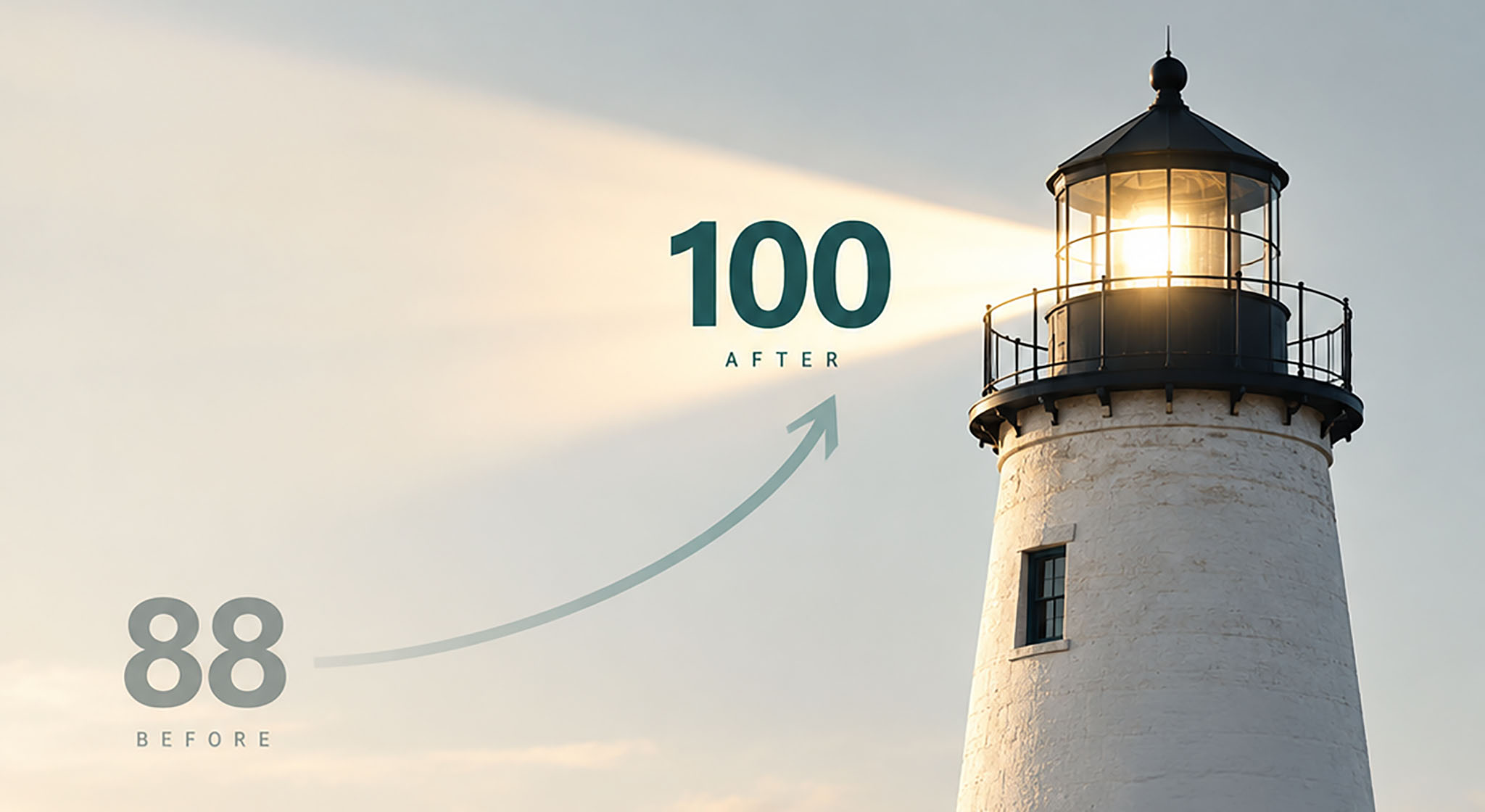
A website this large doesn’t become accessible by accident.
Columbus Regional Health’s website serves patients, caregivers, providers and community members who depend on clear, usable access to healthcare information.
With more than 1,000 pages, the website presented accessibility challenges across its code, content, multimedia, documents and publishing practices.
Addressing those challenges meant looking beyond individual pages. Shared templates, reusable components and content-management workflows could introduce barriers across large portions of the site.
I led a multi-year accessibility initiative to identify and remediate those issues while establishing more sustainable practices for maintaining accessibility as the website evolved.
Website pages
Unlighthouse accessibility score
Days between recorded scores
The score was the easy part to explain.
The work behind it was considerably more complicated.
What are Lighthouse and Unlighthouse? Learn what automated accessibility scores can—and can’t—tell us.
Lighthouse is Google’s automated website auditing tool. Among other things, it checks a page for certain accessibility issues, such as images without alternative text, form controls without accessible labels, insufficient color contrast and some problems with how page elements are structured. It produces an accessibility score from 0 to 100.
That score is useful for identifying issues and tracking improvements, but it is not a measure of how accessible a website is overall. Lighthouse can detect only a subset of accessibility problems. It cannot reliably determine whether alternative text is meaningful, whether a page makes sense when read by a screen reader, or whether someone can successfully complete a task using only a keyboard.
There was another limitation: a standard Lighthouse audit evaluates one page at a time. CRH.org had more than 1,000 pages, and fixing a handful of prominent pages wouldn’t tell us much about the rest of the site.
Unlighthouse helped me take a broader view. It uses Lighthouse to run automated audits across multiple pages of a website, making it possible to identify recurring issues, compare results and track progress beyond the homepage. That gave me a practical way to find patterns across CRH.org rather than treating each page as an isolated project.
A score of 100 does not mean a website is fully accessible. Automated tools can detect only some accessibility issues. Screen reader experiences and real-world tasks also require human review and testing.
Keyboard access & interaction
Evaluating the site as a person might use it without a mouse: moving through navigation, links, forms and interactive components with a keyboard. I investigated barriers that automated scoring alone could not establish, then worked through the underlying markup and behavior.
Accessible video
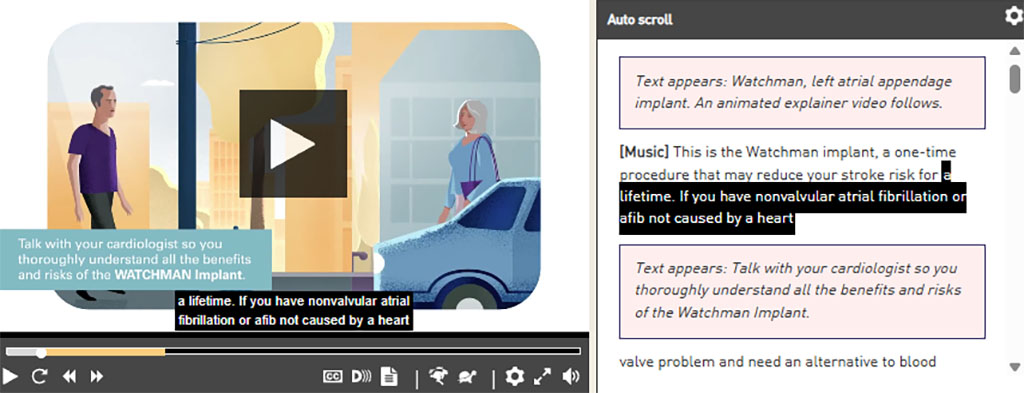
I developed a reusable video widget using the open-source Able Player. It supported captions, transcripts and audio description tracks, including pausing the video when a description needed additional time to be heard.
Content, code & documents
Remediation extended across shared templates, headings, image alternatives, navigation and downloadable PDFs. Some problems could be corrected once in a reusable component; others required reviewing and repairing individual pieces of content.
Evaluation & governance
I developed my accessibility expertise while doing the work, combining automated checks with manual evaluation and documented findings. I also authored CRH’s public website accessibility statement and worked with Legal on its approval.
BEHIND THE SCORE
A video player
that does more
than play video.
A conventional video embed was not enough for the accessibility features we needed. Viewers needed access to captions, a transcript and audio descriptions of important visual information.
I built a reusable video widget around Able Player, an open-source accessible media player. The widget supported audio description tracks and could pause playback while an extended description was spoken, giving viewers time to receive information that otherwise appeared only on screen.
The result was a practical, reusable solution within our existing website—without purchasing a separate commercial video platform.
Some barriers
don’t show up
in a score.
Automated tools helped identify problems. They could not tell the whole story.
Use the keyboard.
Can someone reach and operate the navigation, controls and forms without a mouse? Does focus move in a logical order, remain visible and avoid becoming trapped? These questions require evaluating how the interface actually behaves.
Understand the content.
A page can pass automated checks and still be difficult to understand or navigate. Heading structure, meaningful image alternatives, clear links and the reading order all matter.
Go beyond the web page.
Accessibility work also extended to downloadable PDFs. Those documents needed their own review and remediation rather than being treated as separate from the visitor’s experience.
Document what you find.
I produced accessibility evaluation reports to record findings and guide remediation. The goal was not simply to clear a list of automated warnings, but to identify barriers and establish a repeatable way to address them.
Automated testing, manual review and continued remediation serve different purposes. No single tool establishes that an entire website is accessible to every visitor.
Thirty days.
Twelve points.
A lot of work.
Between October 17 and November 16, 2024, the recorded Unlighthouse accessibility score increased from 88 to 100.
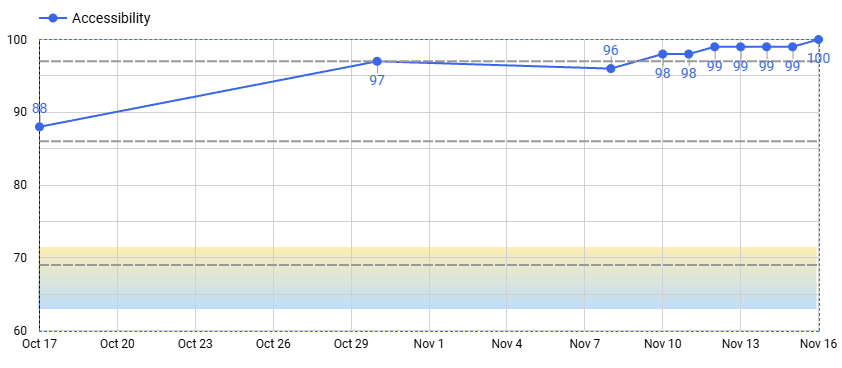
An Unlighthouse score is one automated measurement, not a certification of website-wide WCAG conformance. The broader accessibility initiative included remediation work beyond what a single automated score can measure.
05 / BEYOND THE SCORE
A perfect score
isn’t the finish line.
Accessibility isn’t something you complete once and walk away from.
A large healthcare website is constantly changing. New content is published, documents are uploaded, features are introduced and existing systems evolve.
The longer-term objective of this initiative was to make accessibility an ongoing part of web development and content management, rather than an occasional remediation project.
That means continuing to evaluate the experience, address new barriers and incorporate accessibility into the way digital work gets done.